
Step 1
Copy your team’s calendar link from GameChanger.
The link is in the GameChanger app on your iPhone. It takes four taps.
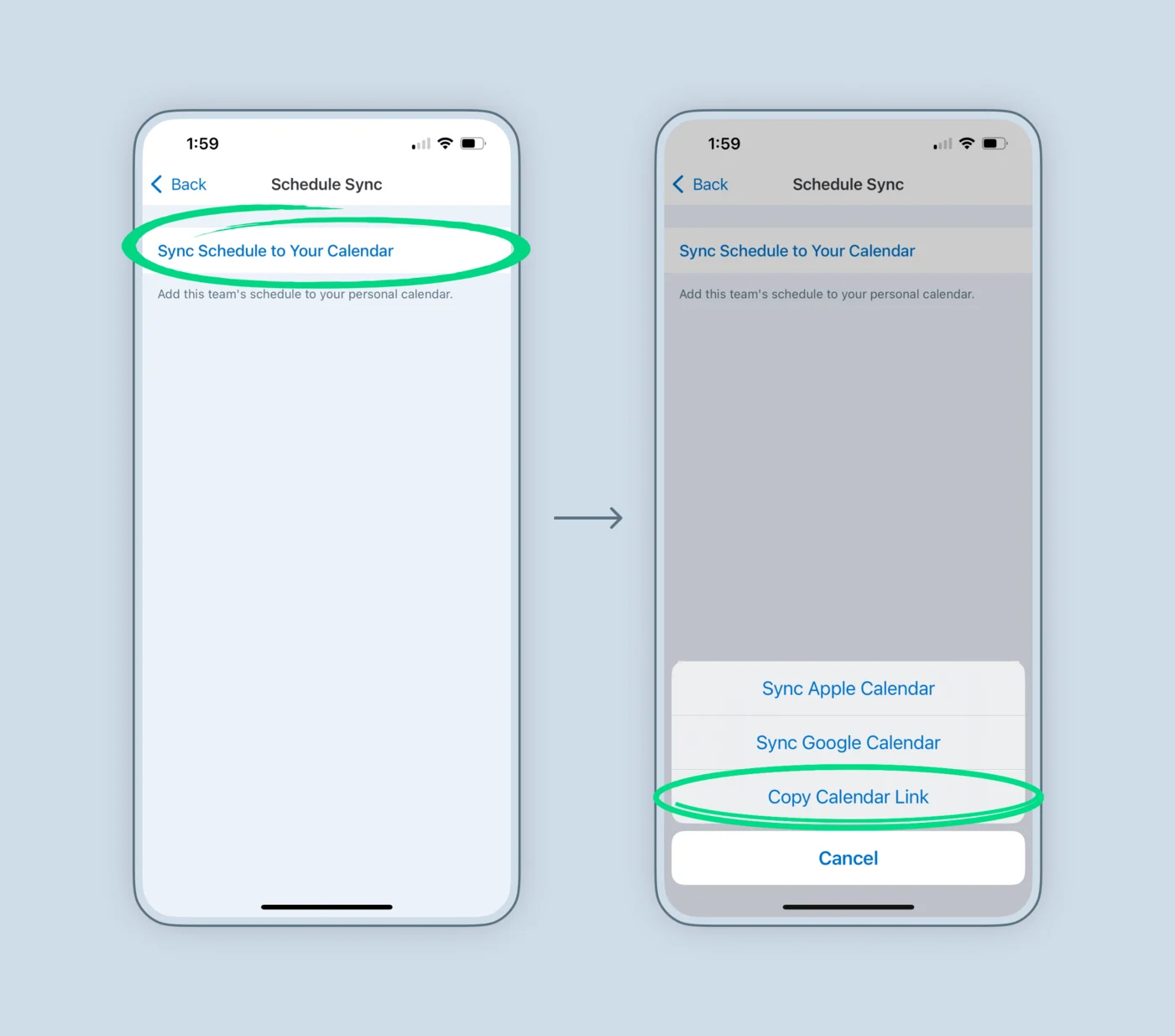
Choose Copy Calendar Link, not Sync Apple Calendar. Sync Apple Calendar adds the schedule to the calendar on your phone only, and doesn’t give you a link to share.
-
01
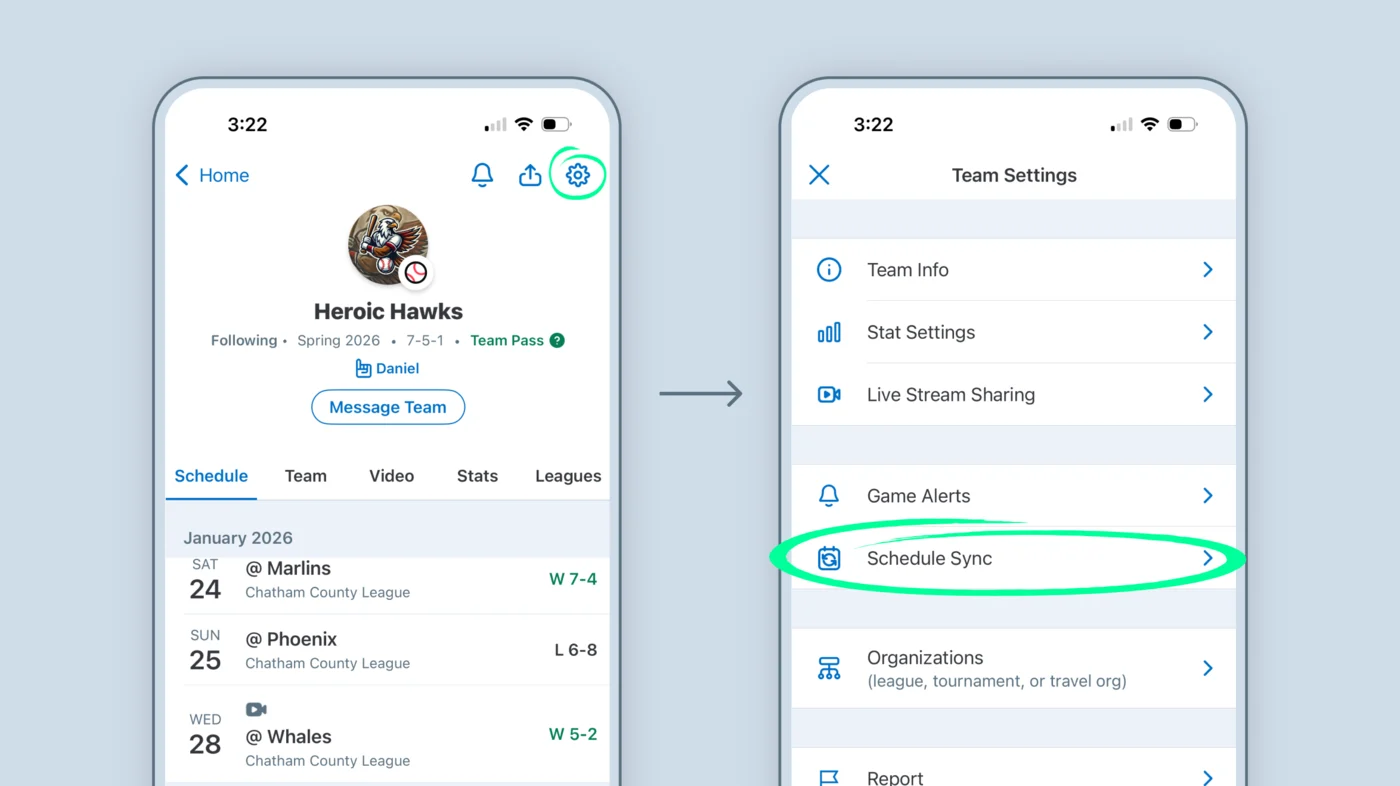
Open your team’s settings
On the Home tab, tap your team, then tap the gear in the top-right corner. In Team Settings, tap Schedule Sync.
-
02
Tap Sync Schedule to Your Calendar, then Copy Calendar Link
The link is now on your clipboard, ready for GamePlan. Have more than one GameChanger team? Do this for each one.
Step 2
Paste the link into GamePlan.
Only the person setting it up needs GamePlan. It takes about a minute.
-
1
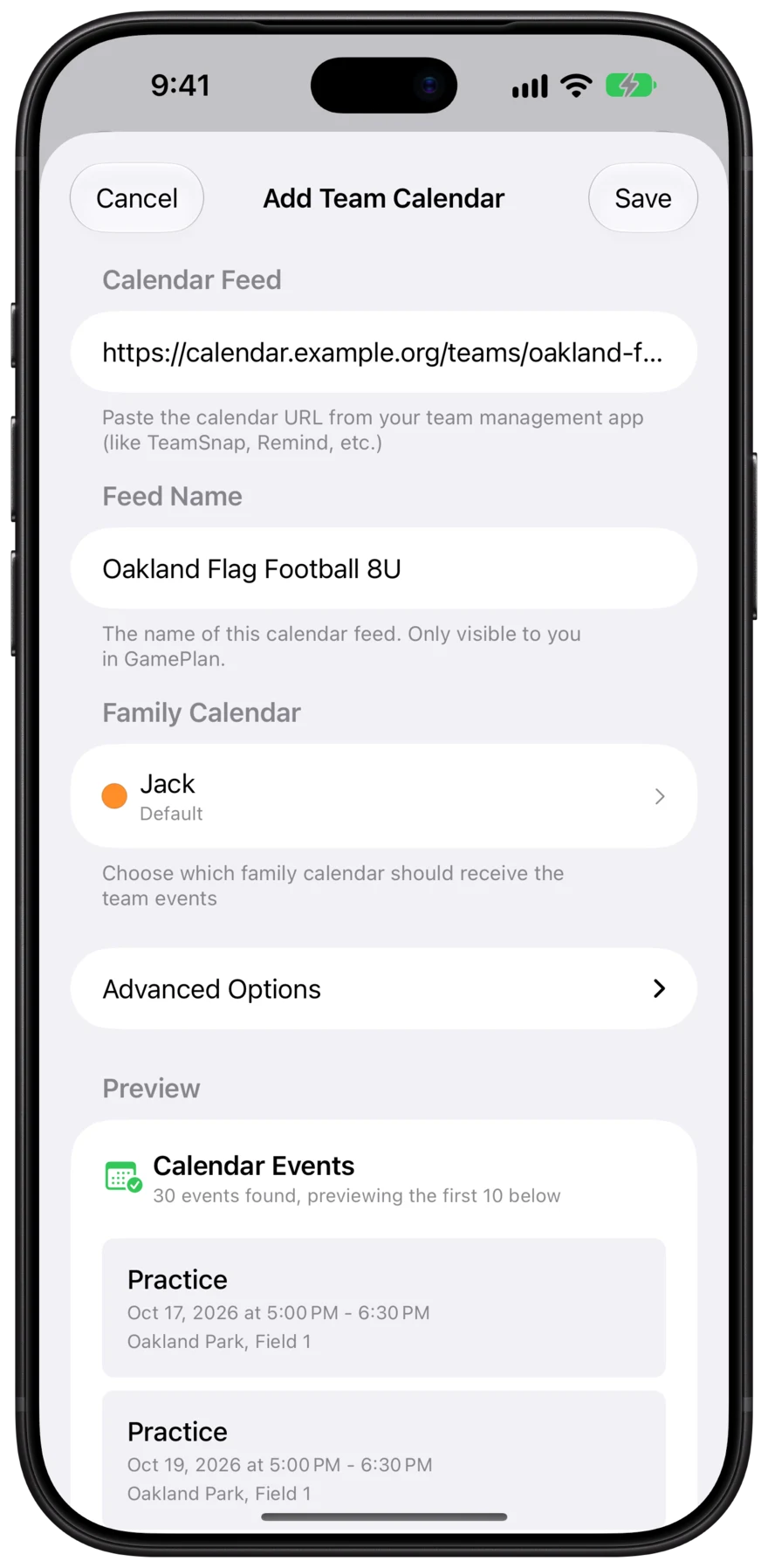
Tap + and choose Calendar Subscription
GamePlan fills in the GameChanger link you just copied. You can also share the link to GamePlan from Safari.
-
2
Choose whose calendar it goes on
Pick a calendar you’ve shared with your family, like “Emma.” It can be an iCloud, Google, or Outlook calendar. How to set one up
-
3
Check the preview and tap Save
GamePlan shows you the upcoming GameChanger events before anything is added to the calendar.
The result
The GameChanger schedule, on everyone’s calendar.
Everyone you shared the calendar with sees every game and practice in the calendar app they already use. Nobody else has to install GameChanger or GamePlan.

- One setup for the whole family
- Parents, grandparents, and kids all see the schedule without subscribing to GameChanger’s calendar one by one.
- iPhone, Mac, and Android
- Put it on a shared iCloud calendar for Apple devices, or a shared Google calendar so family members on Android see it too.
- Changes show up everywhere
- When the coach moves a game in GameChanger, GamePlan updates it on every calendar and tells you exactly what changed.
FAQ
GameChanger questions.
- Why not just tap Sync Apple Calendar?
- It only adds the schedule to the calendar on the phone you tapped it on. Your partner, the grandparents, and older kids would each have to set it up themselves, for every team. With GamePlan, you set it up once on a calendar you’ve already shared with them.
- Practices aren’t showing up, only games.
- GameChanger only includes practices for staff, players, and parents or guardians. Fans who follow a team get just the games. Ask the coach to add you as a parent or guardian, then copy the link again and edit the team in GamePlan.
- Does it work with Google Calendar?
- Yes. Add your Google account to your iPhone, then choose a shared Google calendar in GamePlan. Family members see the GameChanger schedule in Google Calendar on Android, iPhone, or the web.
- Will it show up on our Skylight or other family wall calendar?
- Yes, as long as the wall calendar is connected to the iCloud or Google calendar GamePlan adds the GameChanger events to.
- Do I need a paid GameChanger plan?
- No. Schedule Sync is part of GameChanger’s free features. GamePlan is free for one team; unlimited teams is a small subscription.
- Is it safe to share the link?
- The link is tied to your GameChanger account, so keep it to yourself. With GamePlan you don’t need to send it to anyone: your family sees the events on the calendars you’ve shared with them.
Kids on teams in other apps?
GamePlan works with any app that has a calendar link, so every team ends up on the same family calendars. See all team apps



Get the whole family on the same page.
Free for your first team. Set up in about a minute.

GameChanger is a trademark of GameChanger Media, Inc. GamePlan isn’t affiliated with or endorsed by GameChanger Media, Inc.. Screenshots of GameChanger are from GameChanger Media, Inc.’s help center.