
Step 1
Get your calendar links from TeamSnap ONE.
TeamSnap ONE doesn’t show the links in the app. It emails them to you, so have your email open on the same iPhone.
-
01
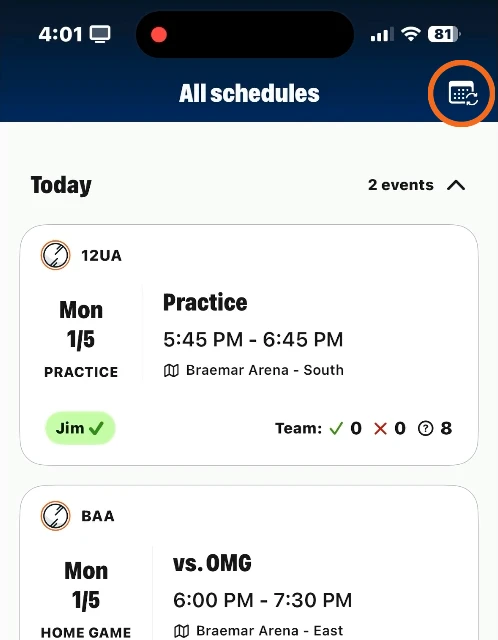
Open All schedules
In the TeamSnap ONE app, tap All schedules at the bottom of the screen.
-
02
Tap the calendar button and choose Sync other calendar
The calendar button is in the top-right corner. Choose Sync other calendar, and TeamSnap ONE sends the links to the email address on your account.
-
03
Copy a team’s link from the email
The email has a link for each of your teams, plus one with every team together. The links aren’t tappable on purpose. Press and hold to select the whole link, then tap Copy.
One team, or all of them?
Use each team’s own link to put each child on their own calendar, in their own color. The all-teams link puts everything on one calendar, which works well for a single family calendar.
On a computer?
Sign in at go.teamsnap.com, open your team, and click the round calendar button at the top right of its schedule.
Step 2
Paste the link into GamePlan.
Only the person setting it up needs GamePlan. It takes about a minute.
-
1
Tap + and choose Calendar Subscription
GamePlan fills in the TeamSnap ONE link you just copied. You can also share the link to GamePlan from Safari.
-
2
Choose whose calendar it goes on
Pick a calendar you’ve shared with your family, like “Emma.” It can be an iCloud, Google, or Outlook calendar. How to set one up
-
3
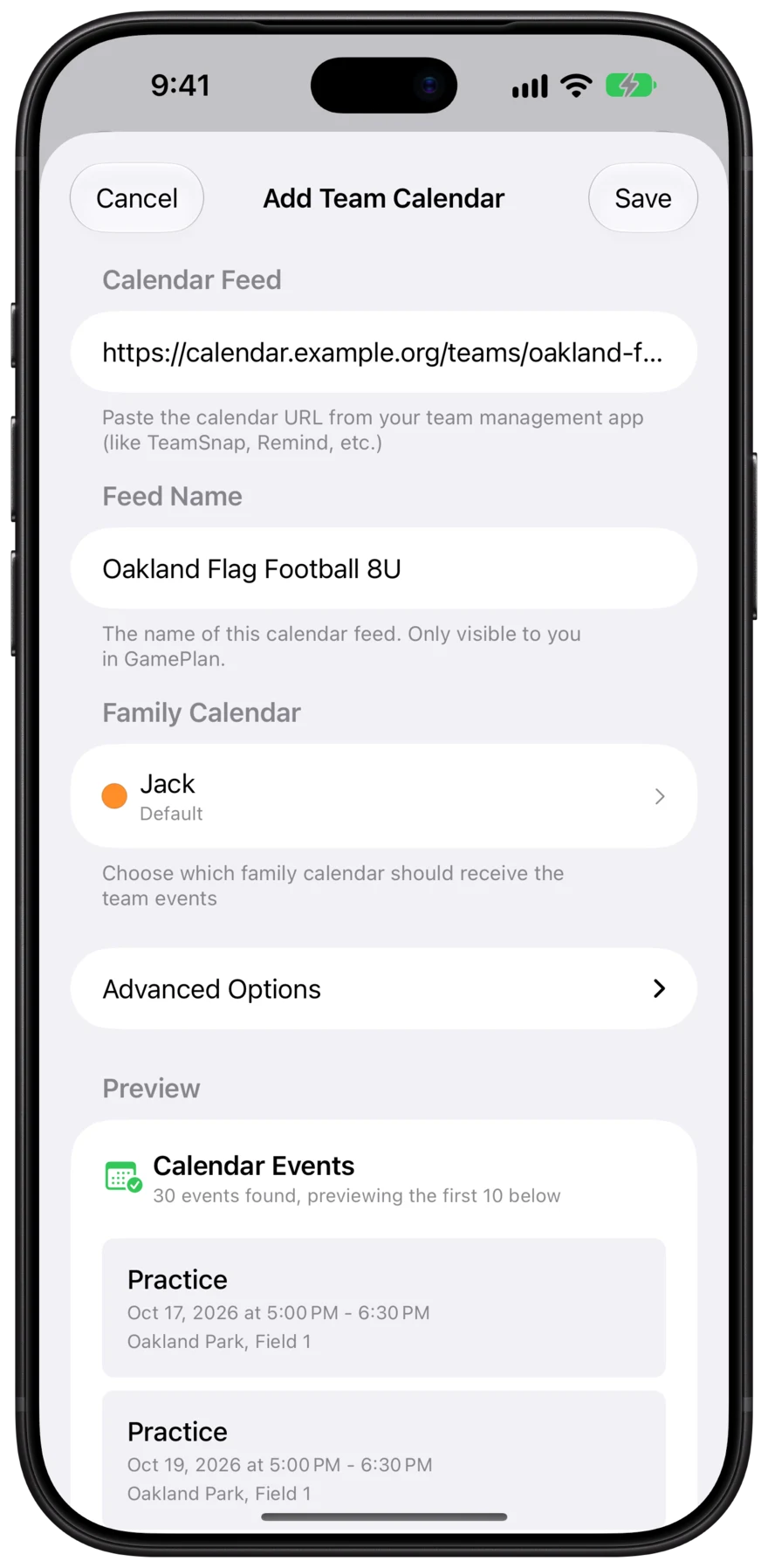
Check the preview and tap Save
GamePlan shows you the upcoming TeamSnap ONE events before anything is added to the calendar.
The result
The TeamSnap ONE schedule, on everyone’s calendar.
Everyone you shared the calendar with sees every game and practice in the calendar app they already use. Nobody else has to install TeamSnap ONE or GamePlan.

- One setup for the whole family
- Parents, grandparents, and kids all see the schedule without subscribing to TeamSnap ONE’s calendar one by one.
- iPhone, Mac, and Android
- Put it on a shared iCloud calendar for Apple devices, or a shared Google calendar so family members on Android see it too.
- Changes show up everywhere
- When the coach moves a game in TeamSnap ONE, GamePlan updates it on every calendar and tells you exactly what changed.
FAQ
TeamSnap ONE questions.
- Is TeamSnap ONE the same as TeamSnap?
- No. TeamSnap ONE is a newer app that clubs and leagues sign up for, with an orange square icon. The original TeamSnap app has an orange circle icon, and its calendar link is on the TeamSnap website. See the TeamSnap steps
- We have teams in both TeamSnap and TeamSnap ONE.
- TeamSnap ONE’s links only include your TeamSnap ONE teams. Add the others from TeamSnap too, and choose the same family calendars. GamePlan puts them all in one place.
- Why not just subscribe to the link on my iPhone?
- A subscription only reaches your own devices. Your partner, the grandparents, and older kids would each have to set it up too, for every team. With GamePlan, you set it up once on calendars you’ve already shared with them.
- Does it work with Google Calendar?
- Yes. Add your Google account to your iPhone, then choose a shared Google calendar in GamePlan. Family members see the schedule in Google Calendar on Android, iPhone, or the web.
- Will it show up on our Skylight or other family wall calendar?
- Yes, as long as the wall calendar is connected to the iCloud or Google calendar GamePlan adds the TeamSnap ONE events to.
- What happens when the coach changes the schedule?
- GamePlan checks several times a day, updates the event on everyone’s calendar, and sends you a notification saying what changed. Swipe the team in GamePlan to sync right away.
Kids on teams in other apps?
GamePlan works with any app that has a calendar link, so every team ends up on the same family calendars. See all team apps




Get the whole family on the same page.
Free for your first team. Set up in about a minute.

TeamSnap and TeamSnap ONE are trademarks of TeamSnap, Inc. GamePlan isn’t affiliated with or endorsed by TeamSnap, Inc.. Screenshots of TeamSnap ONE are from TeamSnap, Inc.’s help center.